

Introduction to Google Messages
In today’s fast-paced digital world, communication goes far beyond simple text. People expect speed, security, creativity, and seamless interaction across devices. That is exactly what Google Messages delivers. As Google’s official messaging app, it has quickly become the standard for billions of users worldwide. By using Rich Communication Services (RCS), the next-generation upgrade from SMS and MMS, Google Messages creates a smarter and more expressive way to stay connected.
Whether you are sharing high-quality photos, sending instant videos, or simply chatting with friends in real-time, Google Messages makes conversations feel natural, dynamic, and highly personal. It is not just another messaging tool—it is a platform that redefines how we connect with each other.
Introduction to Google Messages
What Makes Google Messages Different?
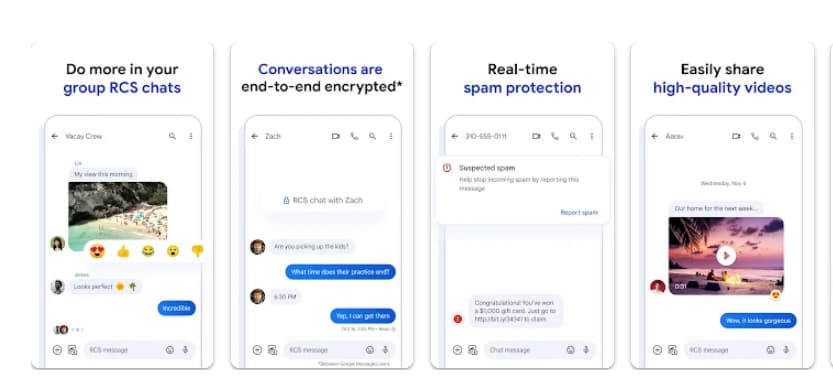
Unlike traditional SMS and MMS, which were limited to plain texts or low-resolution images, Google Messages offers a richer communication experience. Powered by RCS, it brings a host of modern features, including:
-
The ability to share high-resolution media files.
-
Real-time typing indicators that let you see when someone is replying.
-
Group chats that include not only Android users but also your iPhone friends.
-
Enhanced security with end-to-end encryption.
This positions Google Messages as more than just a texting app—it is a secure, feature-packed communication hub for modern users.
What Makes Google Messages Different?
Key Features of Google Messages
1. Rich Communication at Its Best
Google Messages allows you to send and receive high-quality images and videos without compression. Group chats are smarter, with features like dynamic conversation flows, reactions, and real-time responses. The integration with iPhone users ensures that conversations are not interrupted by device boundaries.
2. Personalization and Fun
The app makes chatting more enjoyable by giving you options to customize your experience. Change chat bubble colors, add playful stickers, or create fun selfie GIFs that make your messages truly stand out. Conversations feel less formal and more personal.
3. Advanced Privacy and Security
Security is a top priority. All personal chats between Google Messages users are end-to-end encrypted, meaning only you and the recipient can read the content. Even Google and third parties have no access to your private messages. In addition, the app comes with advanced spam protection to filter out unwanted or suspicious texts.
4. AI-Powered Messaging
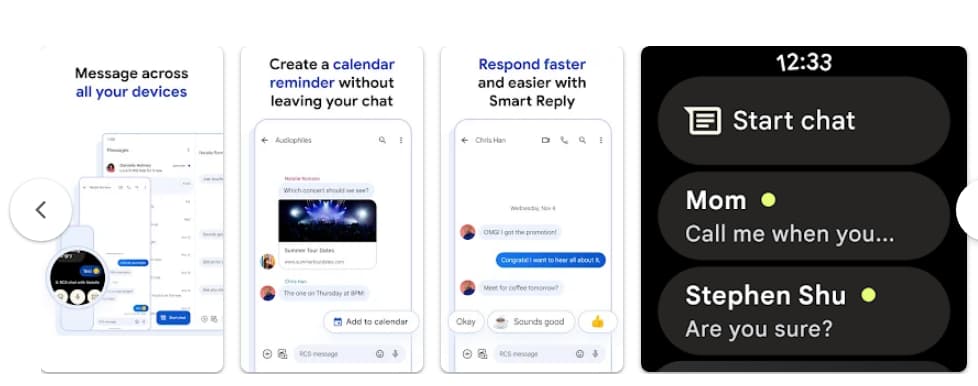
With Magic Compose, Google Messages uses AI to suggest replies or help you craft the perfect message. This feature is ideal for saving time or when you are unsure how to phrase something. The AI-driven tools make communication smoother and smarter.
5. Multi-Device Support
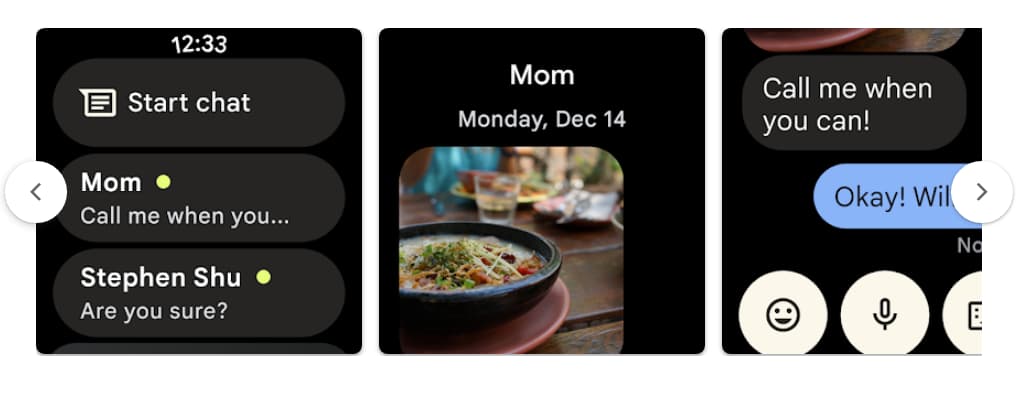
Google Messages works seamlessly across devices. You can start a chat on your phone and continue it on your tablet or computer. It is also compatible with Wear OS, allowing you to reply directly from your smartwatch. This cross-platform availability makes it one of the most versatile messaging apps available.
Key Features of Google Messages
Advantages of Using Google Messages
Choosing Google Messages brings a range of benefits:
-
Universal standard: RCS is becoming the new industry norm, ensuring compatibility across devices and networks.
-
Smoother communication: Say goodbye to outdated SMS/MMS limitations.
-
More expressive chats: From emojis to AI suggestions, your conversations become more interactive.
-
Peace of mind: End-to-end encryption means your private chats remain private.
-
Accessibility: Available on phones, tablets, desktops, and wearables.
In short, Google Messages combines modern technology with user-friendly design to give you everything you need in one app.
How to Get Started with Google Messages
Using Google Messages is simple and intuitive. Here’s a quick guide to help you set it up:
Step 1: Download and Install
Google Messages is available on most Android devices and can be easily installed like any other app. Once installed, you can set it as your default messaging app for a smooth experience.
Step 2: Sign In and Sync
Sign in with your Google account to sync your messages across devices. This step ensures that your conversations are always available, whether you’re on your phone, tablet, or computer.
Step 3: Activate Chat Features (RCS)
When you open the app for the first time, you’ll be prompted to enable Chat features. This activates RCS, unlocking high-quality media sharing, typing indicators, read receipts, and other advanced functions. Depending on your region and carrier, setup may take a few moments.
Step 4: Customize Your Experience
Make Google Messages your own by changing bubble colors, creating group chats, or trying out AI-powered Magic Compose. These small touches make a big difference in how engaging and fun your conversations feel.
How to Get Started with Google Messages
Tips for Maximizing Google Messages
-
Enable Notifications Smartly: Adjust notification settings so you never miss important chats while avoiding spam interruptions.
-
Use the Web Version: Pair your phone with your computer to type long messages easily using a full keyboard.
-
Explore Stickers and GIFs: Add personality to your messages with expressive stickers and GIFs.
-
Backup Conversations: Sync your chats with your Google account for safe storage and easy transfer when switching devices.
-
Try Beta Features: Join the beta testing program to experience upcoming features before anyone else.
Availability and Limitations
Google Messages is widely available but some features vary depending on your region, device, or carrier. For example, RCS activation may depend on your local mobile network. In some cases, features like Magic Compose may still be in beta and rolled out gradually.
The app is compatible with a wide range of devices, including smartphones, tablets, computers, and wearables running Wear OS. A stable internet connection or data plan is required to enjoy RCS features fully.
Why Choose Google Messages Over Other Apps?
While there are many messaging platforms available, from WhatsApp to iMessage, Google Messages stands out because it integrates seamlessly with the Android ecosystem. Unlike third-party apps, it is built and maintained by Google, ensuring strong security, reliability, and continuous improvements.
For users looking for a universal messaging solution that blends modern features with security and accessibility, Google Messages is one of the most reliable choices today.
Google Messages is more than just an upgrade to SMS—it is the future of mobile communication. With its RCS foundation, end-to-end encryption, AI-powered tools, and cross-device support, it gives users a safer, smarter, and more expressive way to connect. From casual chats with friends to important personal conversations, Google Messages ensures that your communication is richer, more engaging, and protected. If you are ready to experience texting in its most modern form, Google Messages is the app you need.









