

In today’s fast-paced digital world, capturing memories has never been easier. Every photo or video we take tells a story, holds a memory, and deserves a safe and organized home. This is where Google Photos comes in—a versatile app designed to keep all your cherished moments in one secure, accessible, and easy-to-use space. Whether you’re a casual photo taker or a photography enthusiast, Google Photos offers the tools you need to back up, edit, organize, and share your memories seamlessly.
What is Google Photos?
Google Photos is a cloud-based photo and video storage solution that combines advanced artificial intelligence with user-friendly features. Unlike traditional storage on your phone or computer, Google Photos allows you to securely back up your content to the cloud, freeing up space on your devices while keeping your memories safe. With Google Photos, you don’t have to worry about losing a photo or a video—everything is stored safely and accessible from any device linked to your Google account.
What is Google Photos?
Key Features of Google Photos
1. 15 GB of Cloud Storage
Every Google account comes with 15 GB of free storage, which is three times more than many other cloud storage services. This storage space is shared across Google Photos, Gmail, and Google Drive, allowing you to keep all your data in one convenient location. With Google Photos, your memories are automatically backed up across devices, ensuring that whether you take a photo on your phone, tablet, or camera, it’s safely stored and accessible anytime.
2. AI-Powered Editing Tools
Editing your photos has never been easier. Google Photos offers powerful, AI-driven editing features that let you enhance your images with just a few taps.
-
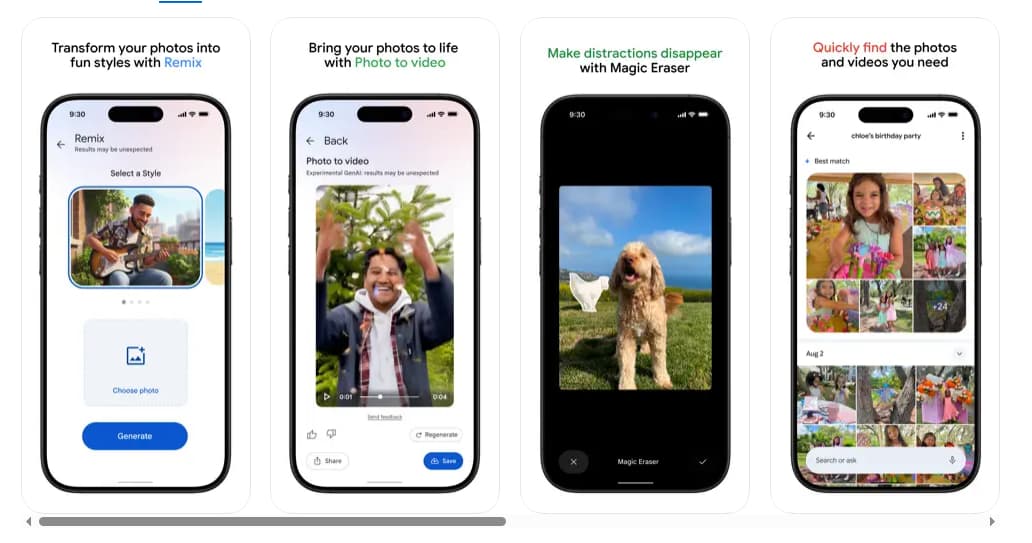
Magic Eraser: Remove unwanted objects or distractions effortlessly.
-
Unblur: Restore clarity to blurry photos, making every shot picture-perfect.
-
Portrait Light: Enhance lighting and brightness for professional-looking portraits.
These tools allow anyone, from beginners to pros, to create polished, high-quality photos without complicated software.
3. Create with Google Photos
Google Photos isn’t just about storage; it’s about creativity. The app comes with innovative AI-powered creation tools:
-
Remix: Bring your photos to life by transforming them into unique styles and layouts.
-
Photo to Video: Turn your static images into dynamic videos, allowing your memories to move and tell a story.
Whether you want to create a fun collage, an animated video, or a themed story from your photos, Google Photos gives you the flexibility to do it all.
4. Search Made Simple
One of the standout features of Google Photos is its intelligent search. No more endless scrolling to find a specific image. Using Google AI, the app recognizes objects, people, places, and even text in your photos. You can search simple terms like “dog” or complex queries such as “recipe for pine nut lemon rice,” and the app quickly delivers accurate results. The smart search functionality saves time and makes your photo library easier to navigate.
5. Easy Organization
Keeping your gallery neat is effortless with Google Photos. The app automatically organizes photos into Photo Stacks for duplicates and similar images. Additionally, it offers intuitive folders for screenshots, documents, albums, and daily camera rolls, creating a clutter-free and personalized gallery. Sensitive photos can be stored in a locked folder, ensuring extra privacy protected by your device’s screen lock.
6. Relive and Share Your Favorite Memories
Google Photos makes sharing memories with friends and family simple and fun. You can create albums, share videos, and send individual photos to anyone—even if they don’t use Google Photos themselves. The app also provides a nostalgic feature called Memories, allowing you to revisit special moments from the past in a beautifully curated format.
7. All Your Memories in One Place
With Google Photos, transferring photos from other apps, galleries, or devices is straightforward. Once backed up, all your content is consolidated in one place, making it easy to manage and access your digital memories without switching between multiple platforms.
8. Your Memories Are Safe
Security is a top priority. Google Photos protects your photos and videos with advanced security infrastructure. From the moment you store your content to the moment you share it, Google Photos ensures your data is encrypted and safeguarded against unauthorized access.
9. Free Up Space on Your Device
Running out of storage on your phone can be frustrating, but Google Photos eliminates that worry. Once your photos and videos are backed up, you can remove them from your device with a single tap, freeing up valuable storage space for new memories, apps, or files.
10. Print Your Favorite Moments
Google Photos allows you to bring your digital memories into the physical world. You can create photo books, prints, canvas wall art, and more—all directly from your phone. Prices vary depending on the product, but this feature makes it easy to cherish memories in tangible formats.
11. Google Lens Integration
Google Photos also integrates Google Lens, a powerful visual search tool. You can identify objects, landmarks, or text in your photos and take action directly from the app. For example, you can copy text from a document, learn more about a landmark, or translate signs in real-time—all using the photos you already have.
Key Features of Google Photos
How to Get Started with Google Photos
Getting started with Google Photos is simple and quick:
-
Download and Install: Search for Google Photos in your device’s app store. The app is compatible with both Android and iOS devices.
-
Sign In or Create an Account: Use your existing Google account to sign in. If you don’t have one, creating a Google account is free and takes only a few minutes.
-
Enable Backup & Sync: Once signed in, enable automatic backup to ensure all your photos and videos are safely stored in the cloud.
-
Explore Features: Begin exploring editing tools, search functions, and creative options like Remix and Photo to Video.
-
Organize and Share: Create albums, set up folders, and share memories with friends and family effortlessly.
Why Download Google Photos?
Google Photos is more than just a storage app; it’s a complete photo management solution. Here’s why you should download it today:
-
Convenience: Access your photos anytime, anywhere from multiple devices.
-
Safety: Keep your memories secure with top-level security measures.
-
Creativity: Transform your photos with AI-powered editing and creative tools.
-
Efficiency: Search, organize, and manage your photo library effortlessly.
-
Space-Saving: Free up device storage while keeping your content accessible.
-
Sharing Made Simple: Share albums, videos, and photos without limits.
By consolidating storage, security, creativity, and smart organization in one app, Google Photos stands out as the go-to solution for anyone looking to preserve, enhance, and enjoy their digital memories.
Why Download Google Photos?
Tips for Making the Most of Google Photos
-
Regular Backups: Always enable backup to prevent accidental loss of photos.
-
Use Locked Folder: Keep sensitive content private for extra security.
-
Try Editing Tools: Experiment with Magic Eraser, Unblur, and Portrait Light to enhance your photos instantly.
-
Organize Albums: Use smart folders and custom albums to keep your gallery tidy and accessible.
-
Create Memories: Explore the Memories tab to relive special moments in a curated experience.
-
Print Your Favorites: Transform your digital content into physical keepsakes that last a lifetime.
In a world where we capture countless moments every day, having a reliable, intuitive, and secure platform for your photos and videos is essential. Google Photos combines cloud storage, AI-powered editing, creative tools, and smart organization features to make your digital life easier and more enjoyable. By offering 15 GB of free storage, robust security, and seamless sharing options, it ensures that your memories are not only safe but also beautifully presented and easy to access.
Whether you’re looking to back up photos, edit images like a pro, relive special memories, or share your life with loved ones, Google Photos is the ultimate app for keeping all your memories in one place. Download Google Photos today and start transforming the way you store, organize, and enjoy your photos and videos.









