

Introduction to Messenger
Messenger is one of the most popular communication apps worldwide, offering a simple yet powerful way to connect with anyone, anytime. Designed by Meta, Messenger gives you the ability to chat, call, share photos and videos, and build communities all in one place. Unlike traditional messaging apps, Messenger integrates seamlessly with your Facebook account, while still allowing you to connect with people without needing their phone numbers.
Whether you want to keep in touch with friends and family, collaborate with classmates, or even follow your favorite creators, Messenger offers tools to make your communication experience engaging, secure, and fun. In this article, we’ll dive into Messenger’s main features, its advantages, and how you can start using it today.

Introduction to Messenger
Key Features of Messenger
Messenger stands out because it goes far beyond simple text messaging. Let’s take a closer look at what makes it such a versatile app:
1. Chat and Call Anyone, Anywhere
Messenger allows you to send messages and make audio or video calls to your friends and family without needing a phone number. You can find people using their Facebook profiles or connect directly through Messenger. This feature is especially useful for staying in touch across countries without worrying about international calling costs.
2. Meta AI Assistant
Messenger includes access to Meta AI, a smart assistant that can help answer questions, provide recommendations, and even assist with tasks like homework or research. In select regions, users can also use Meta AI to create and edit images, making the assistant both practical and creative.
3. High-Definition Photo Sharing
If you love capturing memories, Messenger makes it easy to share them. You can send and receive high-resolution photos, ensuring that special moments remain crisp and clear.
4. Shared Albums
Group chats often revolve around shared experiences. With Messenger, you can create albums inside group chats to organize photos and videos from events like vacations, weddings, or family gatherings. Everyone in the chat can view, contribute, and relive the moments together.
5. QR Code Connections
Meeting someone new in real life? Messenger allows you to add them instantly by scanning a QR code or sharing your personal code via a link. It’s a fast and convenient way to expand your network.
6. Large File Sharing
Messenger supports direct file sharing of documents like Word, PDF, and Excel files up to 100MB. This makes it not only a social app but also a practical tool for school or work collaboration.
7. Edit and Unsend Messages
Accidentally sent the wrong message? Messenger lets you edit your text for up to 15 minutes after sending. You can also unsend a message if you prefer to remove it completely, giving you greater control over your conversations.
8. Disappearing Messages
For private conversations, Messenger offers disappearing messages in end-to-end encrypted chats. You can set how long messages remain visible after they are read, ensuring your communication stays as temporary as you want it to be.
9. Community Building
Messenger isn’t just for one-on-one chats. You can join or create groups to connect with people from your school, neighborhood, or shared interests. Communities make it easier to share updates and stay engaged with people who matter to you.
10. Creator Broadcast Channels
Messenger allows creators to build direct relationships with their audiences through broadcast channels. Fans can join and receive authentic, casual updates directly from the creators they love.
11. Stories and Notes
Just like on Facebook and Instagram, you can post Stories that last 24 hours to highlight your daily moments. Additionally, Messenger Notes let you share quick thoughts or updates with your friends, which also disappear after 24 hours.
12. Expressive Chat Features
From animated stickers and GIFs to emojis and reactions, Messenger makes your conversations more fun. You can also customize chats with a wide range of themes, from seasonal holidays to collaborations with popular artists.
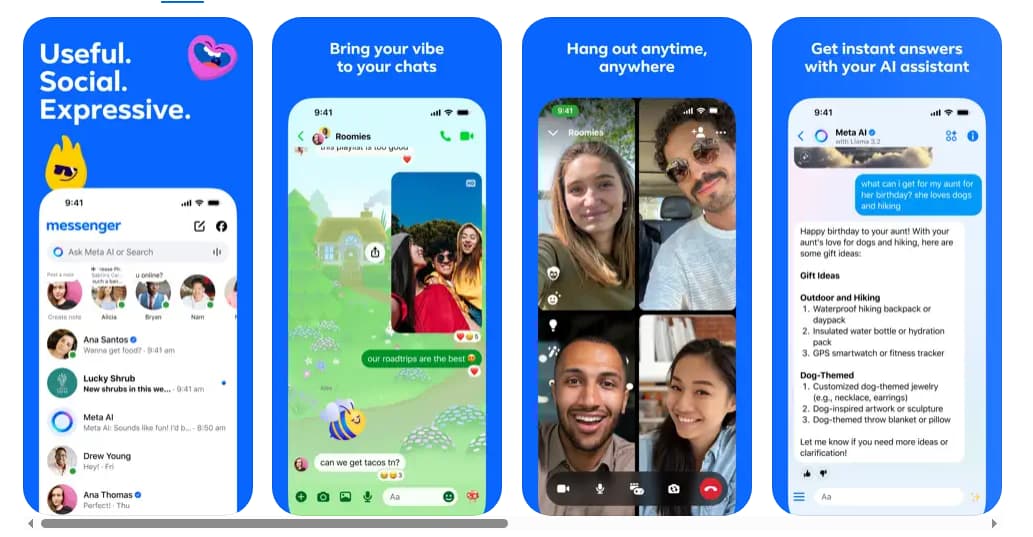
Key Features of Messenger
Benefits of Using Messenger
Messenger is not just another chat app; it’s a multi-purpose communication tool. Here are some of its main benefits:
-
Free and accessible – Messenger is free to download and use, making it available to anyone with a smartphone or computer.
-
Cross-platform compatibility – It works on iOS, Android, and desktop, so you can stay connected no matter which device you use.
-
No phone number needed – Unlike apps that require your mobile number, Messenger lets you connect with people through their Facebook profile or QR codes.
-
Enhanced security – With end-to-end encryption available for private chats, your messages and calls are protected.
-
Community and collaboration – Whether for school, work, or hobbies, Messenger offers tools for group communication and file sharing.
-
Constant updates – Meta regularly introduces new features, themes, and security improvements, keeping the app fresh and reliable.
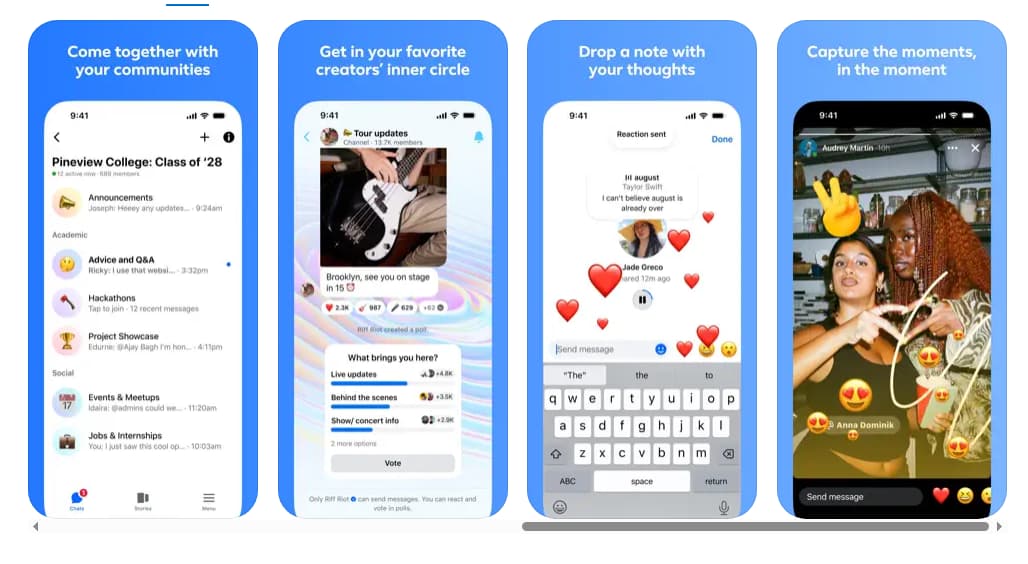
Benefits of Using Messenger
How to Get Started with Messenger
Starting your journey with Messenger is simple. Here’s a step-by-step guide:
Download the App
Messenger is available on both mobile devices and desktops. Head to your device’s app store, search for “Messenger,” and install it.
Create or Log in to Your Account
If you already have a Facebook account, you can log in using your existing details. If not, you can create a new Messenger account with just your name and a photo, without needing a Facebook profile.
Set Up Your Profile
Once logged in, you can personalize your profile by adding a profile picture, updating your display name, and setting your status.
Find Friends
You can sync your contacts or use search to find friends by name. Alternatively, scan their Messenger QR code for quick connection.
Start Chatting and Calling
Now you’re ready to send messages, share media, or make free audio and video calls anywhere in the world.
Tips for Using Messenger Effectively
To make the most out of Messenger, consider these tips:
-
Organize conversations by pinning your most important chats at the top.
-
Use reactions to quickly respond without typing.
-
Enable dark mode for a more comfortable viewing experience at night.
-
Set up message requests to filter chats from people you don’t know.
-
Turn on notifications wisely so you don’t miss important updates but avoid being overwhelmed.
-
Experiment with themes to bring more personality to your conversations.

Tips for Using Messenger Effectively
Why Choose Messenger Over Other Apps?
While there are many messaging apps available today, Messenger stands out because of its strong integration with Facebook, wide range of features, and user-friendly interface. Unlike apps that only focus on either social communication or work collaboration, Messenger combines both worlds. You can chat with friends, follow creators, and share files for school or work—all in a single app.
Moreover, its global popularity ensures that chances are high your friends and family are already using it. This makes it easier to connect without convincing others to switch platforms.
The Future of Messenger
Meta continues to innovate Messenger by adding features such as AI-powered tools, enhanced community functions, and new creative elements. With its constant growth and updates, Messenger is expected to remain one of the leading apps for personal and group communication worldwide.
Messenger is more than just a messaging app—it’s a complete platform for staying connected, sharing moments, and building communities. With its wide range of features like video calling, HD photo sharing, community groups, AI assistance, and expressive chat options, it offers something for everyone. Whether you want to connect with family, collaborate with peers, or follow your favorite creators, Messenger provides a free, secure, and convenient way to do so. If you haven’t already, downloading Messenger and setting up your account will open a world of communication possibilities right at your fingertips.









